

Just Earth News | @justearthnews | 04 Oct 2026, 01:01 pm Print
 Apple
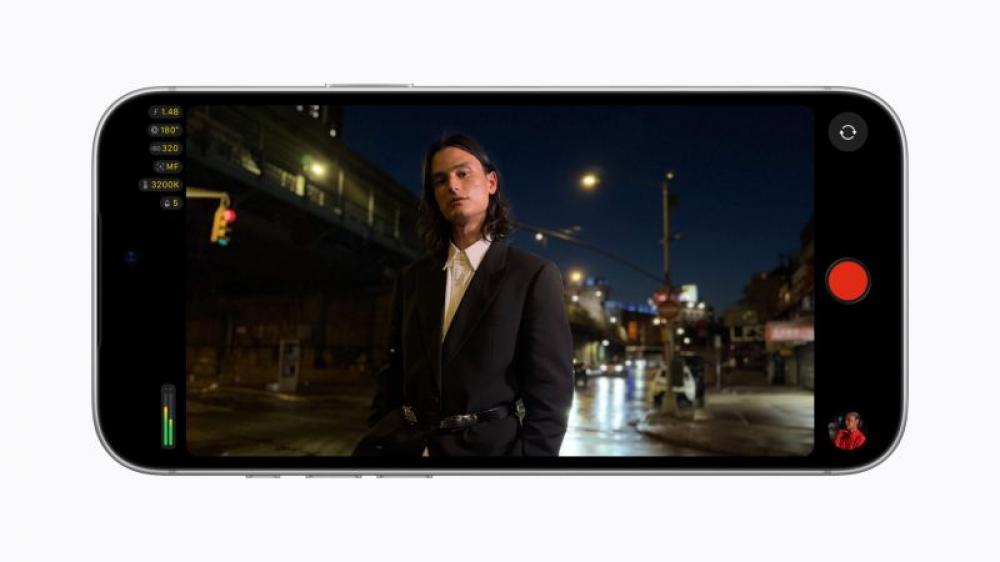
Apple Final Cut Camera gets a new design, support for variable aperture on iPhone 18 Pro, and even more pro options with the release of iOS 27.Photo: Apple/Website
Final Cut Camera, Apple’s professional video recording app for iPhone, has received a major update with version 2.4, bringing a redesigned interface, support for variable aperture on iPhone 18 Pro, and a range of new professional tools with the release of iOS 27.
The new version is available as a free software update from September 29.
Redesigned from the ground up, Final Cut Camera provides creators with easier access to key controls such as shutter angle, ISO and white balance. It also introduces customisable overlays, including false colour and clipping indicators to help ensure proper exposure, as well as improved focus peaking with sensitivity controls.
A new tally light indicates when recording is in progress, while a two-finger tap clears the viewfinder, allowing users to focus entirely on the shot.
With iPhone 18 Pro, creators can take advantage of the new Fusion Main camera with variable aperture, which Apple describes as the most advanced camera it has ever developed. The feature brings aperture control to the iPhone for the first time.
Final Cut Camera allows users to precisely adjust aperture settings or choose between shutter-priority and aperture-priority modes for greater control over video capture.
The update also brings Cinematic mode effects to regular video, including footage recorded in ProRes and Apple Log. This allows creators to adjust focus points and depth of field while editing in Final Cut Pro.
With iOS 27, Final Cut Camera also adds support for professional video scopes, clean SDI output and genlock offset.
Apple said creators can accurately monitor footage using the RGB Parade, which displays the red, green and blue colour channels to help assess colour balance and exposure, as well as the histogram.
With clean SDI output, creators can send a clean video signal through an HDMI-to-SDI converter for broadcast-quality streaming. Genlock offset, meanwhile, allows users to compensate for image artefacts caused by filming a recorded display or for latency differences between an iPhone and other genlocked cameras.
- Is Elon Musk building a flying car? Tesla's new Roadster stuns with rocket thrusters
- Netflix's big layoff shock: 1,000 jobs at risk amid fierce streaming competition
- Is the world heading for a youth jobs crisis? UNDP flags 800 million at risk
- Apple unveils HomePod mini 2 at Rs 18,900: Main features you need to know
- Apple TV 4K with Siri AI, A19 chip announced: Price, Features and Availability


-1791127926.jpg "Image of the day: October 4, 2026")